Many games struggle with optimization issues upon release, which are typically resolved through subsequent patches. However, *FragPunk* has impressed players with its smooth performance right from the start. While there's always room for improvement in frame rates, here are the optimal *FragPunk* settings and crosshair codes to enhance your gameplay experience.
FragPunk Settings Overview
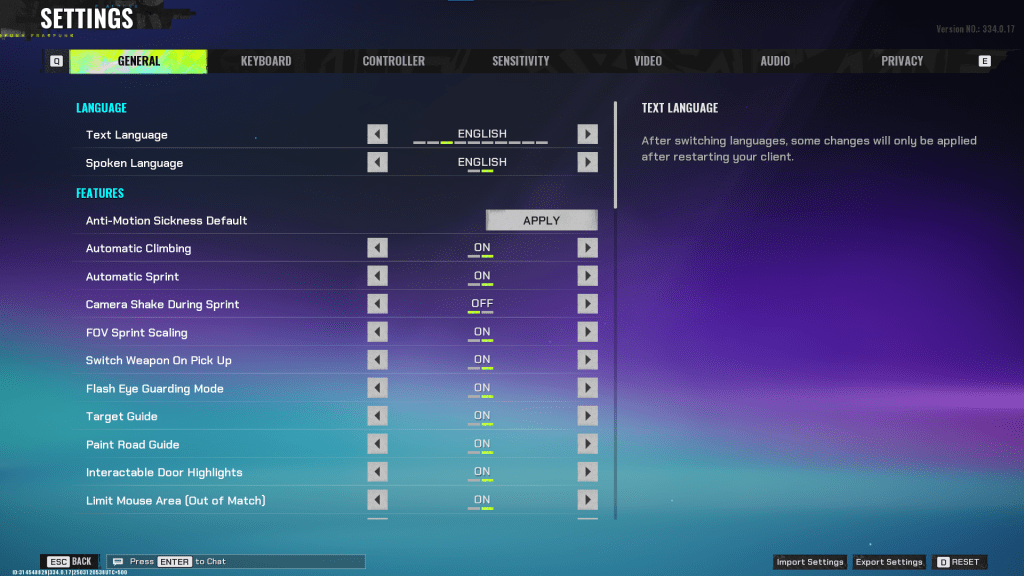
The *FragPunk* settings menu is organized into five tabs. The Video tab is crucial for performance optimization, while the other tabs primarily focus on quality-of-life and accessibility settings. These settings, although not affecting performance directly, can significantly improve your overall gameplay experience. We'll guide you through the settings you should consider adjusting, while others can be left at default or tweaked to your preference.
General
The General tab houses most of the quality-of-life and personal preference settings. It's advisable to experiment with these to find what suits you best. Key settings to adjust include:
- Automatic Climbing – On
- Automatic Sprint – On
- Camera Shake During Sprint – Off
- FOV Sprint Scaling – On
- Flash Eye Guarding – On
- Keep Player Centered – On
- Minimap Orientation Rotate – On
- Performance Metrics – On
- Ping Visibility – 1
- Hide Overly Visible Skin Components from Enemies – On
This tab also includes options for customizing your crosshair, which we'll discuss later.
Keyboard/Controller
These tabs allow you to customize your keybindings. With Automatic Sprint enabled, you can repurpose the Shift key for walking, aligning with common settings in other tactical shooters like *VALORANT* and *CS2*.
Sensitivity
Sensitivity settings are highly personal. Feel free to experiment or convert settings from games like *VALORANT* or *CS2* using an online calculator to find your perfect fit.
Audio
For optimal audio settings, adjust the Sound Effects volume to a comfortable level, and lower the Music, Announcer, and Button Volume. Enable Character Voice Simplification to reduce unnecessary in-game chatter. Voice Chat settings are up to personal preference.
Related: FragPunk Codes (March 2025)
FragPunk Best Video Settings
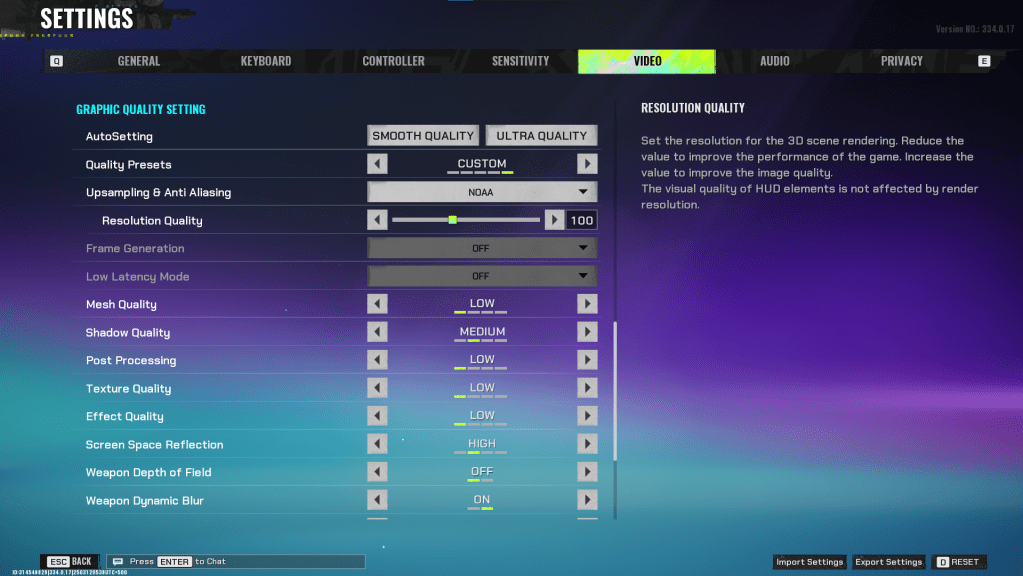
The Video tab is where you'll find the settings that most impact performance. These recommendations prioritize performance over visual quality, which is crucial for a competitive shooter like *FragPunk*. If you have a powerful PC, you might be able to increase some settings, but for most players, these settings offer the best balance of performance and playability.
Display
| Display Screen | Your Preferred Monitor |
| Display Mode | Fullscreen |
| Display Ratio | Monitor’s Default |
| Display Resolution | Monitor’s Native |
| FOV | 125 |
| Filter | Default or Personal Preference |
| Post Processing Intensity | None or Low |
| Menu Frame Rate Limit | 60 |
| Gameplay Framerate Limit | Monitor’s Refresh Rate |
| Out of Focus Framerate Limit | 60 |
| Brightness | 1 or adjust according to preference |
| Sharpen | Same as Brightness |
| Vertical Sync | Off |
| Anti-tearing | Off |
| Graphics API | Experiment with DX11 and 12 to see what works best with your system |
Minimalistic Graphics
*FragPunk* offers a unique Minimalistic Graphics option, which can boost your frame rate by 15-20 fps, albeit at the cost of visual quality. If you're willing to make that trade-off, consider these settings:
| Material Complexity | Minimalistic |
| Light Complexity | Minimalistic |
| Scene Saturation | Minimalistic |
| Effects Complexity | Minimalistic |
| Dead Effect | Off |
| Damage Numbers | On |
| UI Info Simplification | On |
| UI Animation Simplification | Off |
Graphics Quality Settings
| Quality Presets | Custom |
| Upscaling and Anti-Aliasing | Depending on your GPU, choose FSR 2 with Performance for AMD GPUs or NVIDIA Image Scaling with Performance for NVIDIA GPUs. You can also just set it to NOAA with 100% if you don’t want to use any upscaling. |
| Mesh Quality | Low |
| Shadow Quality | Medium |
| Post Processing | Low |
| Texture Quality | Low |
| Effect Quality | Low |
| Screen Space Reflections | High |
| Weapon Depth of Field | Off |
| Weapon Dynamic Blur | On |
| Scene Dynamic Blur | Off |
| Ray Tracing | Off |
| SSGi | On |
| UI Resolution | High. Doesn’t affect in-game FPS. |
| Animation Physical | Off |
FragPunk Best Crosshair Codes
A well-designed crosshair can enhance your precision in *FragPunk*. While it won't make you a pro overnight, it can certainly help. Here are some recommended crosshair codes you can use:
Classic Plus
azazafzaezaezaezaezfczazaabzaafzazaaabzazaczaczaczaczfcbzbzaabzaafzazaaabzFFFFFFzFFFFFFClassic Dot
czazafzaezagzagzagzfczbzaabziedzazaaabzazaczaczaczaczfcbzbzaabzaafzazaaabzFFFFFFzFFFFFFPrecision Plus
azazafzaezaezaezaezabzazaabziedzazaaabzazaczaczaczaczfcbzbzaabzaafzazaaabzFFFFFFzFFFFFFClassic T Shaped
bzazafzaezaezaezaezabzbzaabziedzazaaabzazaczaczaczaczfcbzbzaabzaafzazaaabzFFFFFFzFFFFFThese are the best *FragPunk* settings and crosshair codes to optimize your gameplay experience. *FragPunk is available now on PC.*