
Moon+ Reader is a versatile book reader offering extensive controls and full functionality for any ebook format. It provides comprehensive ebook document management and a well-designed reading experience, all in one app.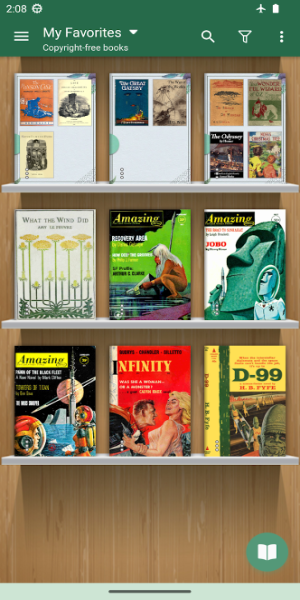
Embrace the Digital Reading Era
The era of technology is rapidly advancing, leading more people to transition from paper books to e-books. E-books offer the advantage of portability, allowing you to carry an extensive library without the bulk of traditional books. Among the numerous e-reading applications available, Moon+ Reader stands out as the premier choice on Android.
Read Easily and Conveniently
Moon+ Reader is the leading e-reader app packed with unique features to give you the best reading experience. This book reader allows you to read text files most easily and conveniently. Not only that, but you can also customize PDF files with the provided features. The experience that this application gives you will make you feel like you are reading a real book. You can easily and quickly archive, highlight lines or bookmarks, and more.
All book archives will be allowed to read in this application, whether PDF, DOX, ZIP, etc. Reading books with your smart device will make you prone to eye strain or eye problems. Don’t worry because this app supports easy lighting adjustment with just a swipe along the left edge of the screen.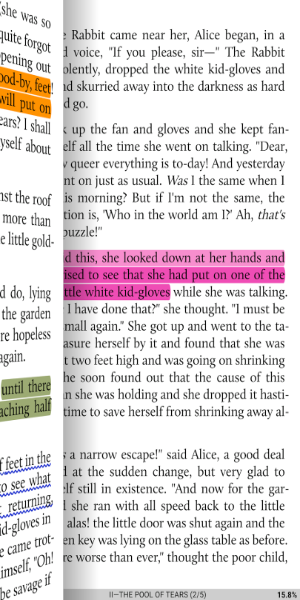
Unique Text Editing Features
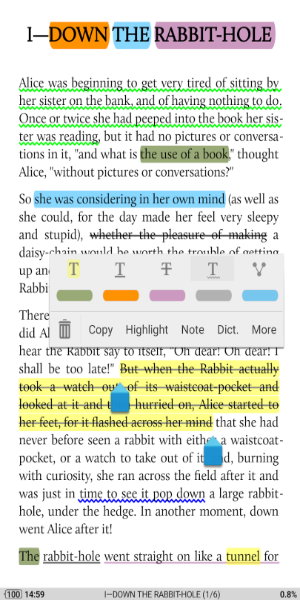
Moon+ Reader offers up to 24 actions for customizing your reading experience. You can zoom in or out, write notes, overwrite, or highlight important information. This app lets you read and edit text as if you were handling a real paper book. You can adjust the font and font size to your liking, making it a flexible text editor.
Additionally, Moon+ Reader functions as a dictionary, allowing you to translate words, including specialized terms, with ease. It supports over 40 popular languages, enhancing its utility for readers worldwide.
Simple to Use
Using Moon+ Reader is straightforward. With a little practice, you can master its functions. On the main screen, select the menu to access various options based on your needs. Choose "Net Library" to read books online from an extensive, unlimited library, or select "My Shelf" or "My File" to read books from your stored files.
Customize Everything You Want
Moon+ Reader is designed to respect your preferences. It offers numerous customization options to suit your needs. Choose your preferred page-turning method with five automatic scrolling modes. Add favorite authors and works to your list. Adjust the screen light with a 95% eye protection filter to make your reading experience comfortable.
Moon+ Reader combines powerful features, ease of use, and extensive customization to provide an unparalleled e-reading experience.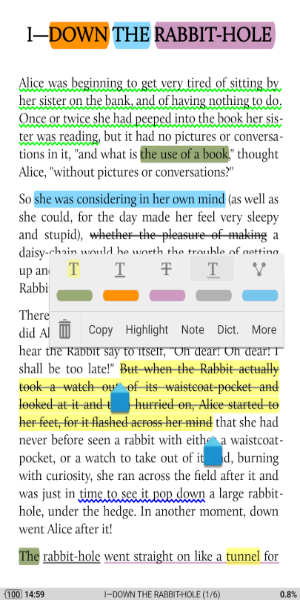
Key Features
-Support EPUB, PDF, DJVU, AZW3, MOBI, FB2, PRC, CHM, CBZ, CBR, UMD, DOCX, ODT, RTF, TXT, HTML, MHT/MHTML, MD(MarkDown), WEBP, RAR, ZIP or OPDS,
-Full visual options: line space, font scale, bold, italic, shadow, justified alignment, alpha colors, fading edge etc.
-10+ themes embedded, includes Day & Night mode switcher.
-Various types of paging: touch screen, volume keys or even camera, search or back keys.
-24 customized operations (screen click, swipe gesture, hardware keys), apply to 15 customized events: search, bookmark, themes, navigation, font size and more.
-5 auto-scroll modes: rolling blind mode; by pixel, by line or by page. Real-time speed control.
-Adjust the brightness by sliding your finger along the left edge of the screen, gesture commands supported.
-Intelligent paragraph; indent paragraph; trim unwanted blank spaces options.
-"Keep your eyes health" options for long-time reading.
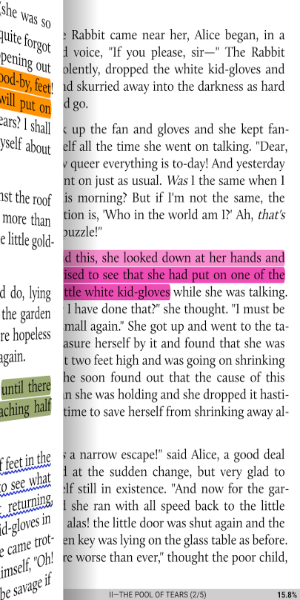
-Real page turning effect with customized speed/color/transparent; 5 page flip animations;
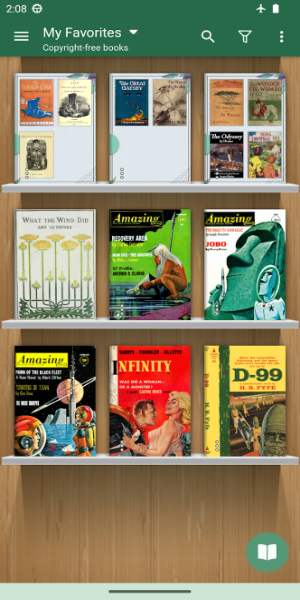
-My Bookshelf design: Favorites, Downloads, Authors, Tags; self bookcover, search, import supported.
-Justified text alignment, hyphenation mode supported.
-Dual page mode for landscape screen.
-Support all four screen orientations.
-EPUB3 multimedia content support (video and audio)
-Backup/Restore options to cloud via DropBox/WebDav, sync reading positions between phones and tablets.
-Highlight, Annotation, Dictionary, Translation, Share functions all in this ebook reader.
-Reading Ruler for focus reading (6 styles) 。
Application Description
Reviews
Post Comments














Trending Apps
More +

2.7.7 / 146.89M

10.5 / 35.00M

24.2.22402212101 / 72.00M

1.8.9 / 15.27M

v3.1 / 3.15M
Top News
- 1 Roblox: ACM Codes for January 2025 Unveiled Jan 20,2025
- 2 Girls’ Frontline 2: Exilium Tier List (December 2024) Feb 23,2025
- 3 "The Last of Us Season 2: Release Date and Streaming Guide" May 04,2025
- 4 "Clair Obscur: Expedition 33 Latest Updates" May 04,2025
- 5 Dead Rising is Getting Remastered Nov 13,2024
- 6 The 10 best TV shows of 2024 Feb 11,2025
- 7 PUBG Mobile's Ocean Odyssey Update: Ahoy, Mateys! Nov 24,2024
- 8 Who Malice Is & How To Get the Invisible Woman Skin in Marvel Rivals Feb 10,2025
Latest Apps
More +

Communication | 10.00M
Seeking a new connection? Discover Sex.Now, the intuitive app designed to help you meet people from all walks of life. Connect with straight, gay, bisexual, and lesbian singles or couples effortlessly. Leverage location-based GPS to find nearby match

Productivity | 169.00M
Microsoft Excel: Spreadsheets is a robust spreadsheet application included in the Microsoft Office suite. It is extensively utilized for financial planning, data analysis, and managing large datasets. Users can effortlessly create budgets, analyze in

Personalization | 34.54M
Parallel Space & Parallel Apps is a robust app cloner that lets you operate multiple accounts on a single device at the same time. Use it to build a parallel space where you can duplicate favourite apps such as WhatsApp and Facebook and effortlessly

Personalization | 3.50M
Meaww Nametests enhances your Facebook fun with engaging, personalized quizzes. Simply click to dive into a world of self-discovery and entertainment. Find out your superhero persona or uncover hidden talents—this app delivers hours of insight and en

Personalization | 11.20M
Curious to know if you're having a boy or a girl? The Baby Gender Predictor app helps you guess your baby's gender quickly and easily. This free app uses the latest design and techniques to give you an accurate prediction along with useful pregnancy

Video Players & Editors | 6.00M
Discover the 1337x App—your go-to platform for free movies, TV shows, music, games, anime, applications, and more! Featuring a clean, intuitive design, the app provides an extensive selection of high-quality videos, films, music tracks, comics, and s
Topics
More +



